 gisvold.org
There is a crowded market in AI meeting notes. I’m a bit tired of it, if I’m honest. I switched from Granola to Wispr Flow because the switching offer was very generous, to the point of being slightly ludicrous. Then Anthropic announced that Claude can now join the video call itself.
I haven’t used Claude Meetings yet. I want to test it. So this is a look at what’s been published, as of 13 November 2026, not a review after living with it. I’ve stuck to what I can source.
As Chief Revenue Officer of Vortex IQ, I look at this less as a shiny feature and more as a practical question. If you already pay for Claude, can you drop the separate note taker? What does it actually cost? And can you trust it with a conversation you’d rather not see in a training set?
What Claude Meetings actually is
Claude Meetings is in beta on Team and Enterprise plans. For now it only works with Google Meet, with other platforms “coming soon”. It isn’t on Pro, Max or Ultra, and it isn’t a paid add-on. On Team plans it’s on by default, and an owner can turn it off. On Enterprise, an owner has to turn it on.
Claude joins as a visible participant. It follows the conversation, writes the notes and action items, and can start work during the call: docs, whiteboards, slides and other artefacts. Your team can ask it questions out loud or in the Meet chat. By default, it answers in writing, rather than speaking. After the call, the notes, transcript and anything it built sit on a meeting page in claude.ai, and people from your organisation who were on the invite can ask Claude about the meeting later.
It isn’t available to organisations with zero data retention, a HIPAA-ready configuration, or customer-managed encryption keys. During the beta, notes, transcripts and in-call answers that don’t use connected tools are included. Using a connected tool counts towards your plan’s usage. Docs, whiteboards and other artefacts made in a call are free through 10 February 2027. What they will cost after that isn’t published. Anthropic is also working with Gong, Attention, Granola, Fireflies.ai, Otter and Plaud, so you’ll soon be able to send a transcript to tools you already use.
Two kinds of note taker
Some tools join the call as a participant. You see them in the list, and customers sometimes ask who they are. Claude Meetings is this kind. So are Fireflies (which also offers a Chrome extension without the bot) and Otter. tl;dv usually sends a bot into Zoom, Google Meet and Microsoft Teams, and also has a desktop recorder. Fathom offers bot capture or bot-free capture, the latter in beta on Mac.
The other kind sits on your device and never appears in the participant list. Granola is bot-free, device-audio capture, on desktop, iOS, Android and Apple Watch. Wispr Flow’s Notetaker is the same idea: Mac or Windows, any meeting app, in-person conversations, and no bot on the call. That’s the product I moved to, after that very generous switching offer.
Zoom’s meeting AI, Microsoft’s Copilot in Teams, and Gemini in Google Meet are a third category: native to the platform you’re already in. No third-party bot, but you’re buying a much larger suite, not a specialist note taker.
How they compare
Prices are from official pages, checked on 13 November 2026. They’re public list prices, usually in US dollars, excluding tax. Currency and tax vary by region. Promotional first-time offers are left out.
| Tool | How it captures | Bot? | Platforms | Key features | Per-seat price |
|---|---|---|---|---|---|
| Claude Meetings | Joins the call and builds docs live | Visible participant | Google Meet only; others “coming soon” | Written answers, live artefacts, notes, meeting page | Included on Team and Enterprise. Team Standard: $25/user/month monthly, or $20 annually (US, excl. tax). Notes included in beta. Artefacts free through 10 February 2027. |
| Wispr Flow | Records from your device | No bot | Notetaker: Mac and Windows; any meeting app, and in-person | Speaker ID, questions about meetings, MCP, dictation | Free with a weekly Notetaker limit (count not published). Pro: $15/user/month monthly, or $12 annually. Growth with unlimited Notetaker: $33 monthly, or $26 annually ($312/year). |
| Granola | Device-audio capture | No bot | Desktop, iOS, Android, Apple Watch | AI notes, chat across meetings, shared folders, MCP | Basic $0, 30-day history. Business $14/user/month, monthly only. Enterprise $35/user/month, monthly or annual. |
| Fireflies.ai | Meeting bot, or Chrome extension without one | Bot, or extension | Zoom, Google Meet, Microsoft Teams and others | Transcripts, summaries, conversation intelligence, CRM | Free $0. Pro $18/user/month monthly, or $10 annually. Business $29 monthly, or $19 annually. Enterprise $39 annually. |
| tl;dv | Meeting bot, or desktop recorder | Bot, or bot-free desktop | Zoom, Google Meet, Microsoft Teams | Recordings, transcripts, summaries, clips | Free €0. Pro €29/seat/month monthly, or €18 annually (€216/year). Business €39 monthly, or €29 annually (€348/year). Euro, as published. |
| Zoom meeting AI | Built into Zoom | Native | Zoom. My Notes also covers some third-party and in-person use | Meeting summaries, in-meeting questions, My Notes | Unlimited meeting summaries come with Workplace Pro, at $16.99/user/month monthly or $14.16 annually (USD), for the whole Pro plan. ZoomMate is $20 monthly or $16.67 annually, with unlimited AI note-taking. Current pages use Workplace and ZoomMate, rather than the older “AI Companion” name. |
| Otter.ai | Joins the call | Bot | Zoom, Microsoft Teams, Google Meet | Live transcription, AI chat, workflows | Pro $16.99/user/month monthly, or $8.33 annually (USD). Business $30 monthly, or $19.99 annually. Enterprise: custom. Promotional first-time rates aren’t used here. |
| Fathom | Bot, or bot-free (beta, Mac) | Choice | Confirm on Fathom’s product pages (not listed cleanly on the pricing page I checked) | Unlimited recordings on Free, summaries, team workspace, CRM on higher tiers | Free $0. Premium $20/user/month monthly, or $16 annually. Team $19 monthly or $15 annually, two-user minimum. Business $34 monthly or $25 annually, two-user minimum. Enterprise is presented around $35 (the page is messy; confirm at checkout). |
Microsoft 365 Copilot, which includes Copilot in Teams, is published as a $30/user/month add-on, paid yearly, and needs a qualifying Microsoft 365 licence. Gemini’s meeting features are included in Google Workspace Business Standard, Business Plus and the Enterprise editions, not sold as a standalone Meet add-on. Those are suite prices, not note-taker prices.
What it costs on a Claude Team plan
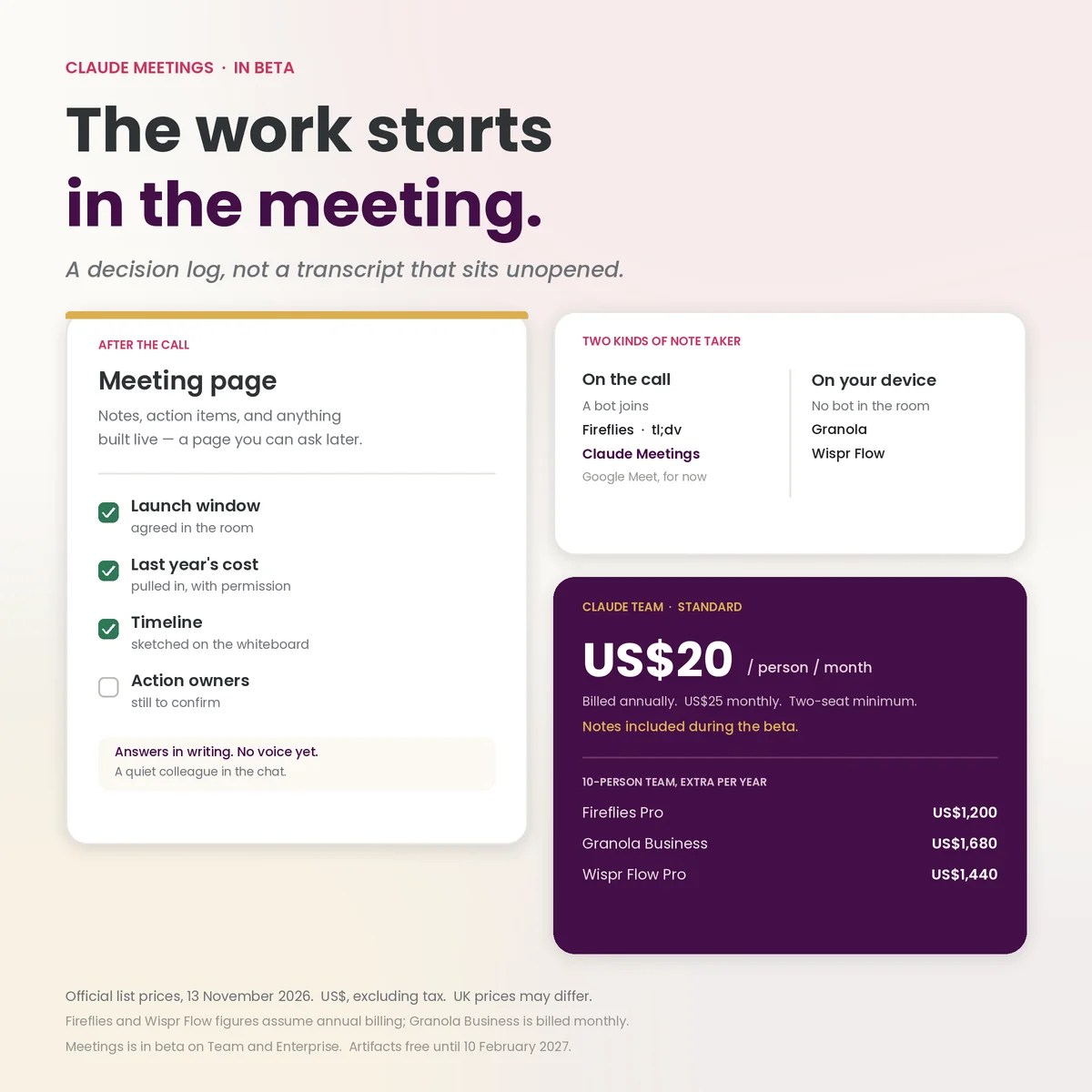
Team plans need at least two members, and go up to 150 seats. Official US prices, from Anthropic’s help article, excluding tax:
- Standard: $25 per member per month, billed monthly, or $20 per member per month, billed annually
- Premium: $125 per member per month, billed monthly, or $100 per member per month, billed annually
Pricing, currency and tax vary by region. The public pages I checked are in US dollars. I haven’t quoted a sterling figure, because I couldn’t confirm one from those pages. If you’re buying in the UK, check claude.ai/upgrade. Meetings doesn’t need a special seat type, and it isn’t an add-on. It’s included on Team and Enterprise while it’s in beta.
Decision logs, and seeing the work as you go
The most interesting part, for me, isn’t the transcript. Plenty of tools can produce one. It’s that Claude can start the work during the call, and leave you with a written record you can actually use. This is how I like to run meetings.
If a meeting is going to produce a decision, I’d rather that decision lived in a document the room can see, not in someone’s memory of what was said at 4pm on a Tuesday. Action items are the same. A list that appears while people are still on the call is harder to wriggle out of later, which is, if we’re honest, part of the point.
The visualisation bit is the other half. Anthropic’s own example is a team planning a customer event. Someone asks Claude to start a doc, then to put the timeline on a whiteboard, and the people on the invite can edit both while the conversation continues. You’re looking at the plan together, and arguing with the actual words, not with a recollection of them.
I’d still want a human to check it. A confident summary of the wrong decision is worse than no summary at all.
Claude as a teammate, without a voice (for now)
Anthropic is quite clearly treating Claude as a participant, not a silent recorder. It has a tile in the call. You can address it by name. It can, with your permission, use your connected tools, for example to look something up or send a Slack message. It asks the first time, and, for now, when someone asks out loud it asks each time to confirm who’s speaking.
It doesn’t have a voice, for now. By default it answers in writing, in the Meet chat. A written answer can be checked, quoted and corrected. It’s also visible to everyone on the call, including, on an internal call, anything pulled from a connected tool.
I personally prefer a tool nobody else sees. That said, a visible one means everyone knows it’s there, and it’s interactive. That’s an honest trade-off, and not only a technical one.
Do you save money by dropping the separate note taker?
We don’t pay for Claude Team yet. That matters, because the maths only works in one direction. This is a simple illustration, not a recommendation and not a quote. It uses annual US list prices where those are published, for a 10-person team, excluding tax, as of 13 November 2026.
For a business already on Claude Team Standard, billed annually, that’s $20 × 10 = $200 a month, or $2,400 a year, which they’re already paying for other work. During the beta, notes, transcripts and ordinary in-call answers come at no extra cost. Connected tools do count towards usage. Artefacts are free through 10 February 2027, and unpriced after that.
If that team dropped a specialist note taker, the annual list prices they would stop paying would be: Granola Business, $1,680; Fireflies Pro, $1,200, or Business, $2,280; Wispr Flow Pro, $1,440 (higher Notetaker limits, not published as unlimited), or Growth with unlimited Notetaker, $3,120; tl;dv Pro, €2,160; Otter Business, about $2,399; Fathom Team, $1,800, with a two-user minimum. On paper, that’s a real saving, in the region of $1,200 to $3,120 a year for ten people, on top of the Claude bill they were already paying.
For a business that isn’t on Team, like ours for now, buying Claude Team only to replace a $10 to $14 note taker would cost more, not less. Team also has a two-seat minimum. It only starts to make sense if you’d use Claude for other work as well.
The other caveats still apply. Meetings only works with Google Meet today, so you still need something else for Zoom or Teams, or you wait for “coming soon”. I wouldn’t build a two-year cost case on a beta price. Some of these tools also do jobs Claude isn’t trying to do yet, such as coaching scorecards or CRM field sync. Wispr Flow, in my case, is also a dictation product I already use. And Anthropic is partnering with several of the same note takers, so coexistence is clearly on their mind as well as replacement.
Can you trust it with the meeting?
This is the question I would ask first, before the price.
Anthropic’s Privacy Centre, in an article dated 18 August 2026 about commercial products such as Claude for Work, says: “By default, we will not use your inputs or outputs from our commercial products (e.g. Claude for Work, Anthropic API, Claude Gov, etc.) to train our models.” They may use chats to train models if you “explicitly report feedback or bugs”, or “otherwise choose to allow us to use your data”. A Team or Enterprise owner can disable that feedback button. Feedback can be kept for up to five years, de-linked from user and customer IDs.
The Commercial Terms say: “Anthropic may not train models on Customer Content from Services.” Customer Content means Inputs and Outputs. I haven’t found a Meetings-specific training statement. The reasonable reading is that a transcript and the notes sit under that rule. That’s a reading of the general terms, not a separate meetings guarantee. The pricing page lists model training on Team as “None by default”.
For Claude for Work, Anthropic keeps chats in the product so you can continue them. Delete a conversation and it leaves your visible history immediately, and is deleted from back-end storage within 30 days, subject to law and usage-policy exceptions. Custom retention is an Enterprise feature, not a Team one.
When Claude joins, it appears as a participant and posts a notice in the chat. It saves a transcript, a summary and screen descriptions, not the audio. Anthropic tells you to make sure everyone is comfortable with being transcribed first. Owners can turn Meetings off, and decide whether Claude may join calls with outside guests. On Team plans, that’s allowed by default. On Enterprise, an owner must allow it first. If guests aren’t allowed, Claude stays out, and leaves if they join. If they are allowed, Claude takes notes but doesn’t reply in the call chat, and guests don’t get the meeting page. What guests say is still included in the notes and transcript.
Organisations with zero data retention, a HIPAA-ready setup, or customer-managed keys can’t use the beta at all.
Fireflies says it “does not use your meeting data to train AI models, and our AI vendors are contractually barred from training on it.” Granola says third parties aren’t allowed to train on your data, but “Granola trains on your anonymized data”, with a per-user opt-out, and training off by default for Enterprise. Wispr Flow lets you opt out of “Improve the model for everyone”, and turns data sharing off for Enterprise. That’s what the vendors say, as of 13 November 2026. It isn’t a substitute for your own security review.
The bigger pattern
Meetings isn’t a one-off. In the same stretch Anthropic has put Whiteboards, Sheets and Data inside Claude, so a board, a spreadsheet and a dashboard can stay there, with the team editing them. It has put Claude into Excel, PowerPoint, Word and Outlook, with one conversation that carries across those apps.
The pattern is fairly clear. Claude is being moved into the places work already happens, and some of those places are now being built inside Claude as well. Meeting notes, documents, whiteboards, spreadsheets. Each one is a gentle nudge at a traditional tool. Whether that ends in replacement, or in a pile of overlapping subscriptions, is still an open question. The partnerships with Granola, Fireflies and Otter suggest Anthropic is hedging too.
Whether Meetings replaces a separate note taker, or sits alongside one, is something I want to test. I’ll report back here once I have. If you’re looking at this for your own team, I’d be interested to compare notes. Find me on LinkedIn.
